> For the complete documentation index, see [llms.txt](https://docs.edgetag.io/llms.txt). Markdown versions of documentation pages are available by appending `.md` to page URLs; this page is available as [Markdown](https://docs.edgetag.io/channels/klaviyo/configuration.md).
# Configuration
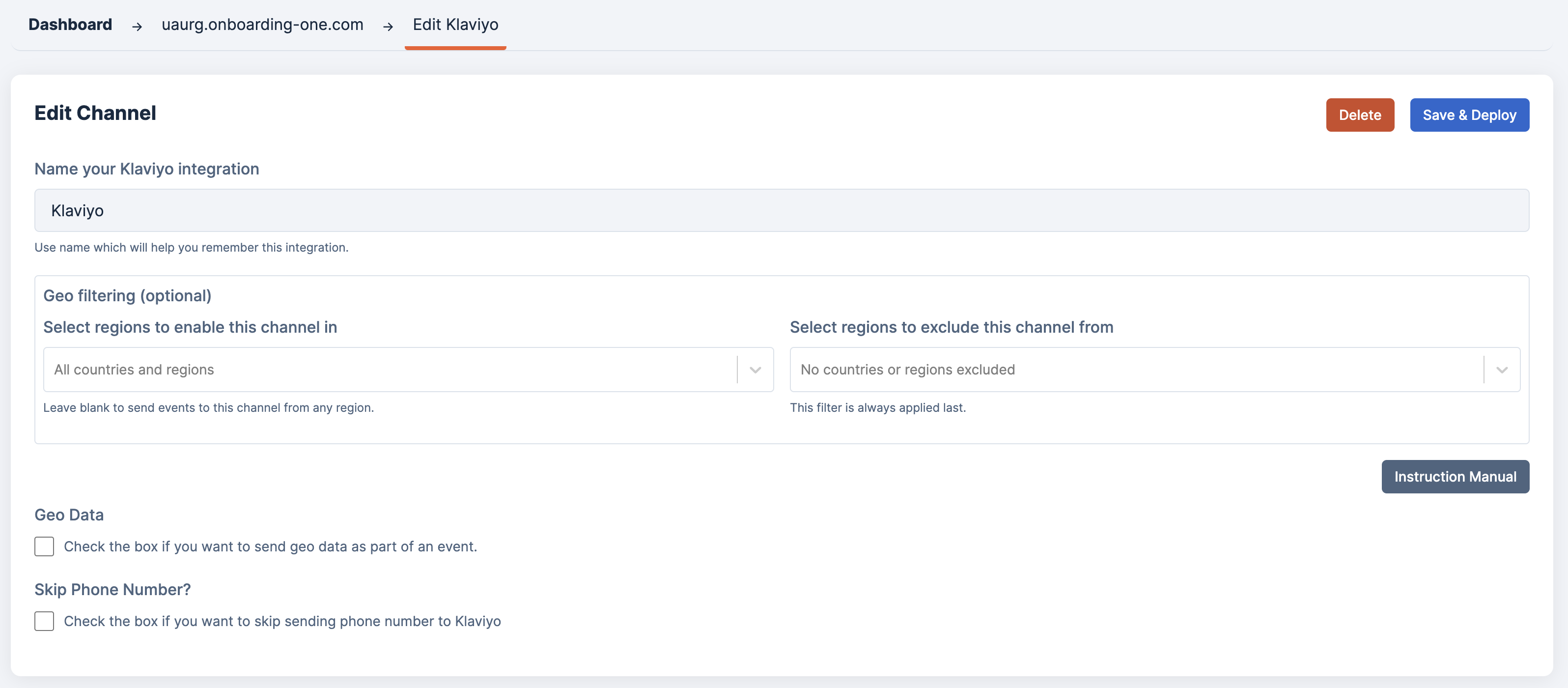
Now that the basic onboarding is complete, let's review all fields in the form and how to use them. The Dataset ID and Ads Account ID were already filled in during the basic onboarding, so we will skip those two.
### Geo Data
By enabling this option, the following additional geo data are added to the event properties
* GEO\_City
* GEO\_Zip
* GEO\_State
* GEO\_Country
### Skip Phone Number?
**Klaviyo applies strict validation rules for phone numbers to ensure data quality and compliance.**
* Phone numbers must be in **E.164 format** (e.g., `+14155552671`), which includes the **+ sign**, **country code**, and the **full subscriber number**.
* Any formatting characters (spaces, dashes, parentheses) or incomplete numbers will be rejected.
* Klaviyo checks that the number is **valid for the given country code**, not just a string of digits.
* If the number fails validation, the event may be dropped or ignored, which can lead to incomplete data syncing.
Due to this strictness, even though we **normalize and validate phone numbers before sending them to Klaviyo**, we still encounter some errors related to phone numbers.
Enabling this option does not include the phone number in the Klaviyo payload.
{% hint style="warning" %}
Only enable this option if you are seeing high number of errors related to phone number not valid.\
It's normal that small number of events could fail because of the phone number.
{% endhint %}
---
# Agent Instructions
This documentation is published with GitBook. GitBook is the documentation platform designed so that both humans and AI agents can read, navigate, and reason over technical content effectively. Learn more at gitbook.com.
## Querying This Documentation
If you need additional information that is not directly available in this page, you can query the documentation dynamically by asking a question.
Perform an HTTP GET request on the current page URL with the `ask` query parameter, and the optional `goal` query parameter:
```
GET https://docs.edgetag.io/channels/klaviyo/configuration.md?ask=&goal=
```
`ask` is the immediate question: it should be specific, self-contained, and written in natural language.
`goal` is optional and describes the broader end goal you are ultimately trying to accomplish on behalf of the user. GitBook uses it to tailor the answer towards what is most useful for that goal.
The response will contain a direct answer to the question and relevant excerpts and sources from the documentation.
Use this mechanism when the answer is not explicitly present in the current page, you need clarification or additional context, or you want to retrieve related documentation sections.