> For the complete documentation index, see [llms.txt](https://docs.edgetag.io/llms.txt). Markdown versions of documentation pages are available by appending `.md` to page URLs; this page is available as [Markdown](https://docs.edgetag.io/channels/meta/configuration.md).
# Configuration
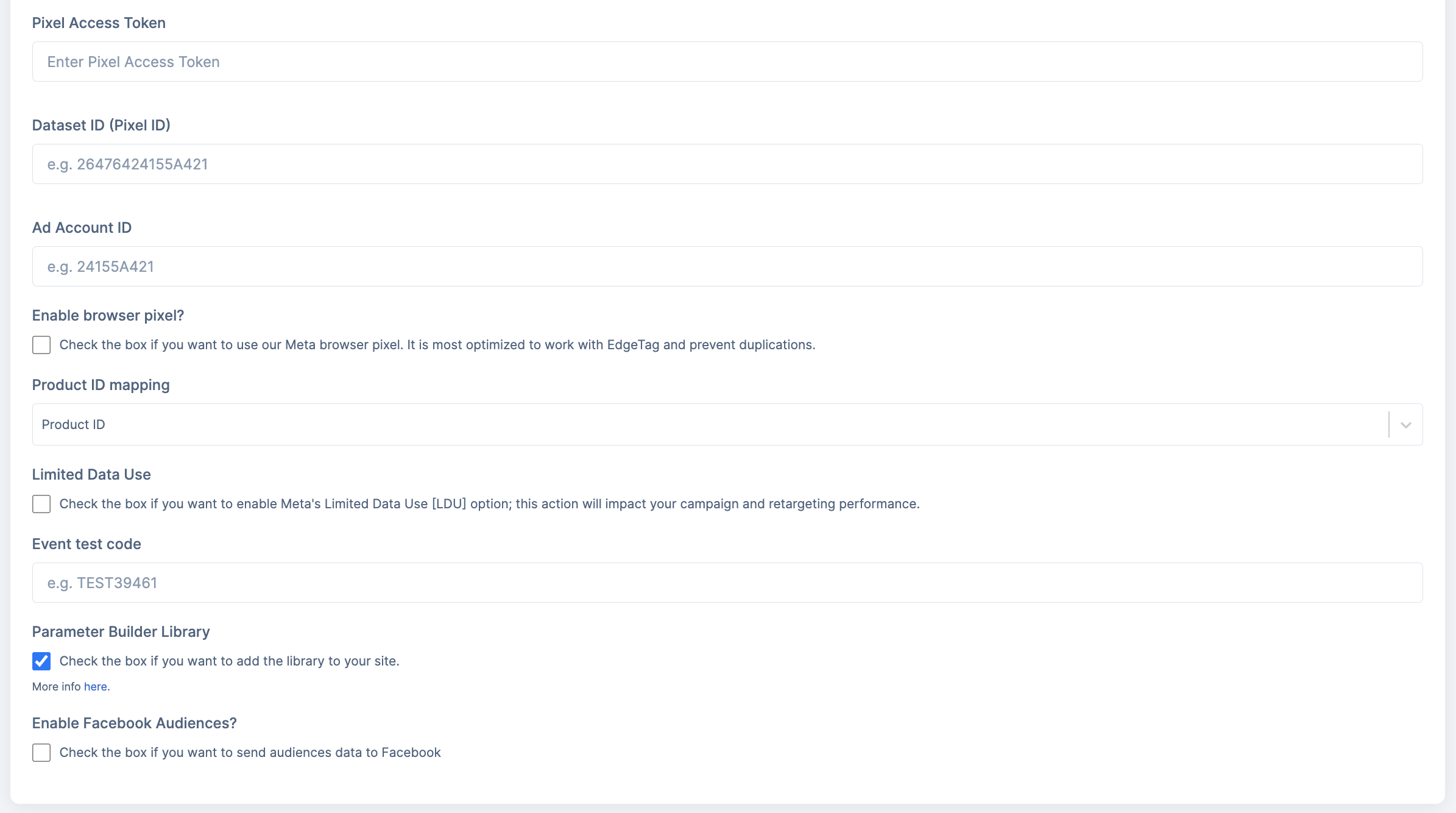
Now that the basic onboarding is complete, let's review all fields in the form and how to use them.
### Enable browser pixel?
The browser pixel is one of the key concepts that Meta is prioritizing. By enabling this option, we will begin sending browser events alongside the server events that you receive automatically. We ensure that both the browser and server events share the same event ID, allowing Facebook to deduplicate events and maximize the benefits from both sources. If you are using our browser integration or any of our apps, enabling this feature will work seamlessly. For headless applications, you will need to add our NPM package to your project to allow support—more on [NPM packages](/implementation/headless/browser-packages.md).
### Product ID mapping
When syncing your product catalog with Facebook, you may be using a different format than what you have in your e-commerce platform. This can result in the content ID expected by Facebook being different from what you're sending from your website. As a result, your catalog match rate will be low. This setting allows you to specify which property from the event you would like to send to Facebook as your product ID.
How can you determine which ID you are using? \
\
1\. Go to your Commerce Manager on Facebook.\
2\. Click on your catalog.\
3\. Expand a product to find the Content ID.\
4\. Compare this ID with the value in your e-commerce platform and find which type it is\
5\. Ensure that the type matches the setting configured in EdgeTag.
### Limited Data Use (LDU)
Enabling this option will cause the LDU flag to be sent to Facebook, which may impact your campaign and retargeting performance. You can read more about it in [their documentation](https://developers.facebook.com/docs/marketing-api/overview/data-processing-options).
### Event test code
To verify that events are being received correctly by the Facebook server, follow these steps:\
\
1\. Open the [Events Manager](https://business.facebook.com/events_manager2/list/) and select your Dataset ID.\
2\. Go to the "Test Events" tab.\
3\. Click on "Confirm your server’s events are set up correctly." \
4\. A test code will appear; click the "Copy" button to copy this code.\
5\. Paste the test code into our form.\
6\. After saving, trigger some events, and you should be able to see them on the Events Manager Test page.
{% hint style="warning" %}
Remove test code before going to production, as it prevents event recording in the events manager.
{% endhint %}
### Parameter Builder Library
Meta has introduced a new option that allows you to fix your Facebook click ID and browser ID using the Parameter Builder Library. You can find more information about this library in [their documentation](https://developers.facebook.com/docs/marketing-api/conversions-api/parameter-builder-feature-library/client-side-onboarding). If you enable this option, we will load the library onto your site.
### Audiences
This feature is used to send audience data to Meta.
When the checkbox is enabled, the authorization flow should be completed.
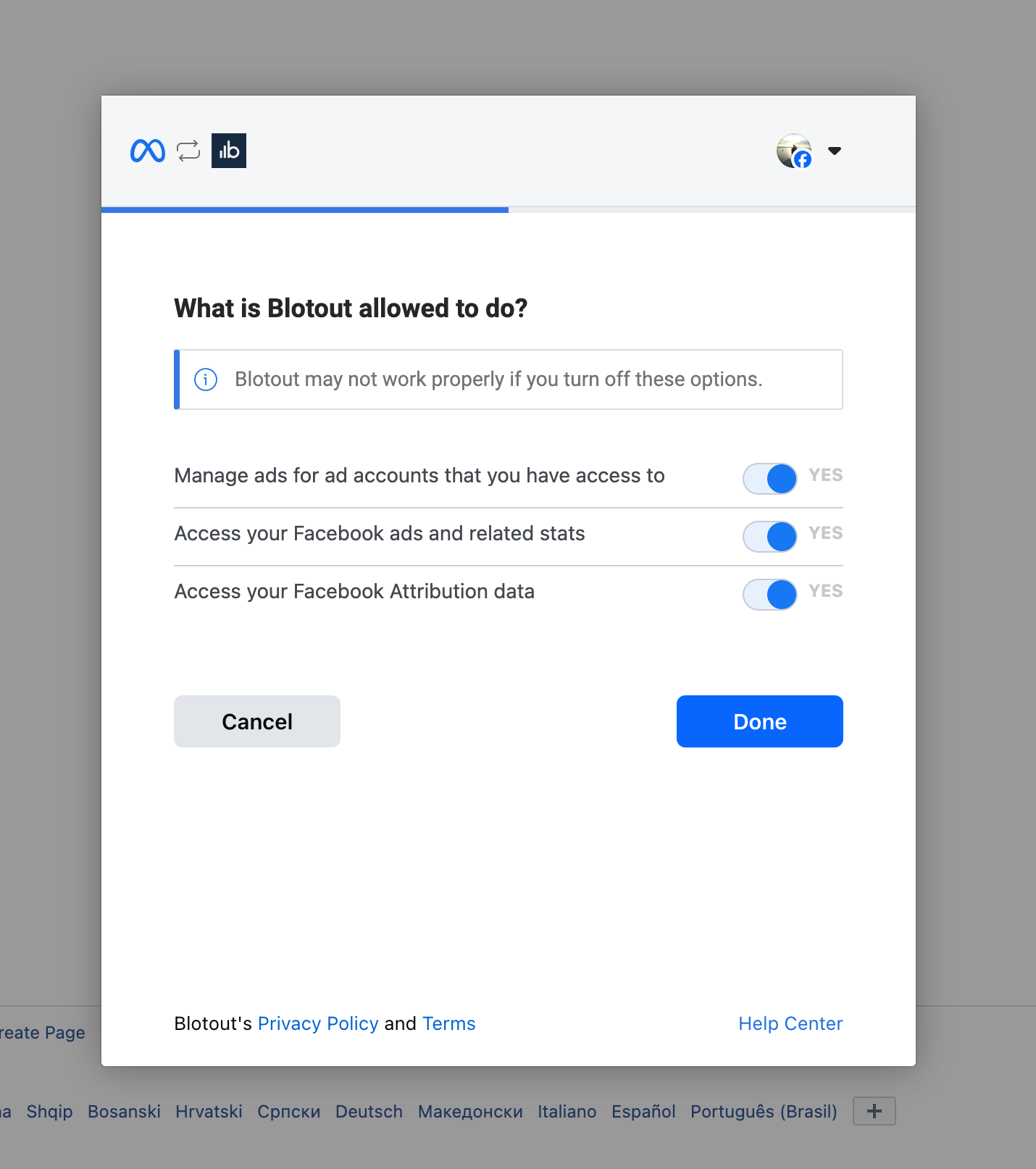
Clicking on `Authenticate` button will redirect you to the Meta authorization flow, where you will need to confirm your identity and permissions required for our system to function properly.
Facebook permissions
After completing the Meta process, you will be redirected back to our app.
Successful completion will enable audiences.
---
# Agent Instructions
This documentation is published with GitBook. GitBook is the documentation platform designed so that both humans and AI agents can read, navigate, and reason over technical content effectively. Learn more at gitbook.com.
## Querying This Documentation
If you need additional information that is not directly available in this page, you can query the documentation dynamically by asking a question.
Perform an HTTP GET request on the current page URL with the `ask` query parameter, and the optional `goal` query parameter:
```
GET https://docs.edgetag.io/channels/meta/configuration.md?ask=&goal=
```
`ask` is the immediate question: it should be specific, self-contained, and written in natural language.
`goal` is optional and describes the broader end goal you are ultimately trying to accomplish on behalf of the user. GitBook uses it to tailor the answer towards what is most useful for that goal.
The response will contain a direct answer to the question and relevant excerpts and sources from the documentation.
Use this mechanism when the answer is not explicitly present in the current page, you need clarification or additional context, or you want to retrieve related documentation sections.