Monetize Klaviyo
Before we Monetize
Before you get started on how-to monetize the incremental audiences, we recommend that you check if you have Klaviyo and Blotout EdgeTag setup correctly.
Note: Please ensure you have added Klaviyo and completed the authorization
Blotout Event
Equivalent Klaviyo Event
Description
PageView
Active on Site
Top of the funnel - every page
ViewContent
Viewed Product
PDP - Product Page viewed
One per page
AddtoCart
Added to Cart
Added to Cart event.
One per Cart addition
InitiateCheckout
Checkout Started
Started Checkout
Purchase
Placed Order
Site Purchases only
For a list of standard Blotout EdgeTag Events please refer to our standard event catalog
If these events are not showing up, please reach out to your Blotout EdgeTag contact directly or via our Slack Forum.
Calculating Incremental Audience
Let's check a couple of segments to measure incremental audiences for lifecycle visitors.
The two we recommend are PDP page visits and Added to Cart for;
Viewed Product incremental audience
Added to Cart incremental audience
These give you a very good idea on how many incremental members you are able to re-identify. You can do the math by checking revenue per recipient to understand overall incremental revenue.
Lets start with Viewed Product.
Incremental Viewed Product
We recommend you use L3 days as a measuring stick to measure incremental audience that your Blotout EdgeTag Server captures for you.
Start with logging in to Klaviyo
Go to Segments and Lists
Create Segment
Follow steps below
Step-by-Step

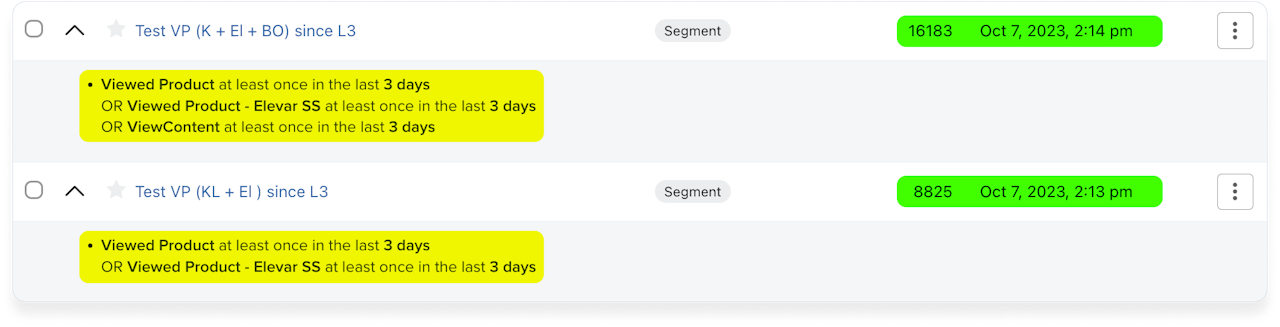
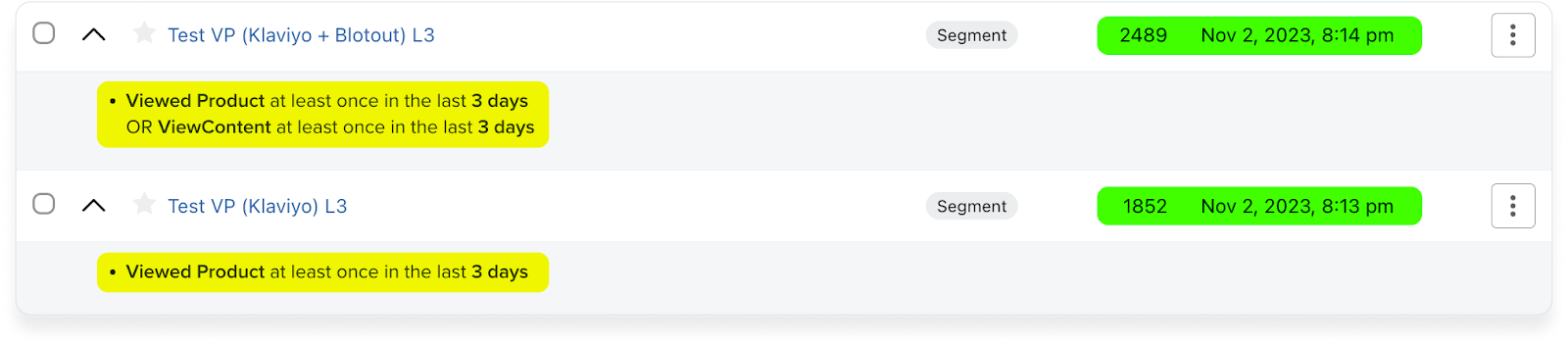
Above is an example for comparing Blotout Events with Regular Klaviyo events; here are the rules -
Segment Name: Test VP (Klaviyo) L3
Rule 1: Where someone has done Viewed Product at least once in last 3 days
COMPARE TO (TEST INCREMENTAL)
Segment Name: Test VP (Klaviyo + Blotout) L3
Rule 1: Where someone has done Viewed Product at least once in last 3 days
OR
Rule 2: Where someone has done ViewContent at least once in last 3 days

The above example compares Blotout with Elevar SS plus Klaviyo events.
Segment Name: Test VP (Klaviyo + Elevar) L3
Rule 1: Where someone has done Viewed Product at least once in last 3 days
OR
Rule 2: Where someone has done Viewed Product Elevar SS at least once in last 3 days
COMPARE TO (TEST INCREMENTAL)
Segment Name: Test VP (Klaviyo + Elevar + Blotout) L3
Rule 1: Where someone has done Viewed Product at least once in last 3 days
OR
Rule 2: Where someone has done Viewed Product Elevar SS at least once in last 3 days
OR
Rule 3: Where someone has done ViewContent at least once in last 3 days
Pro-tip: Just because everyone says they are server-side, does not mean managing ID assets are very well understood. The upside on mid-funnel here is the same advantage on all growth channels
Incremental Added to Cart
We recommend you use L3 days as a measuring stick to measure the incremental audience that your Blotout Server captures for you.
Start with logging in to Klaviyo
Go to Segments and Lists
Create Segment
Follow steps below
Step-by-Step:

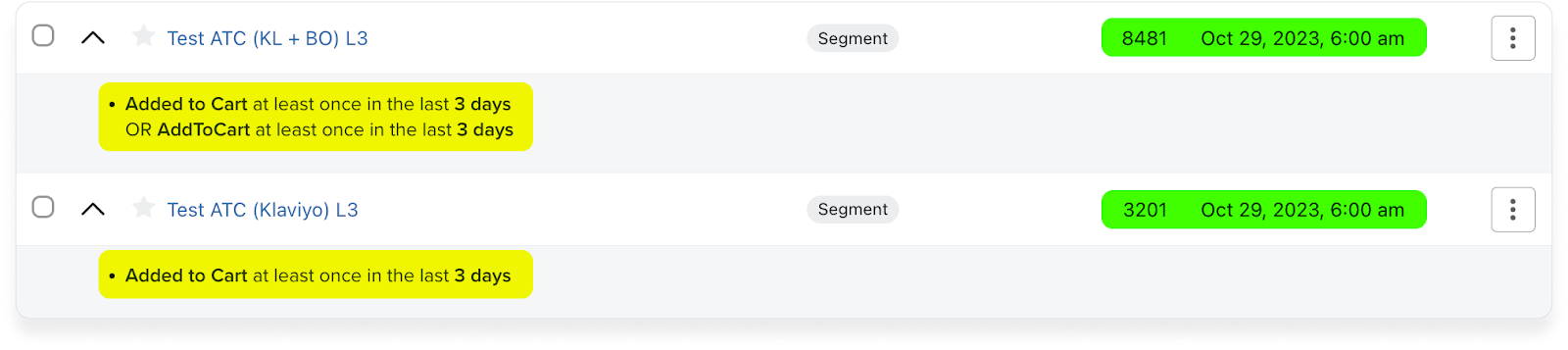
Refer the above image as an example to comparing Blotout with Regular Klaviyo events; here are the rules -
Segment Name: Test ATC (Klaviyo) L3
Rule 1: Where someone has done Added to Cart at least once in last 3 days
COMPARE TO (TEST INCREMENTAL)
Segment Name: Test ATC (Klaviyo + Blotout) L3
Rule 1: Where someone has done Added to Cart at least once in last 3 days
OR
Rule 2: Where someone has done AddtoCart at least once in last 3 days

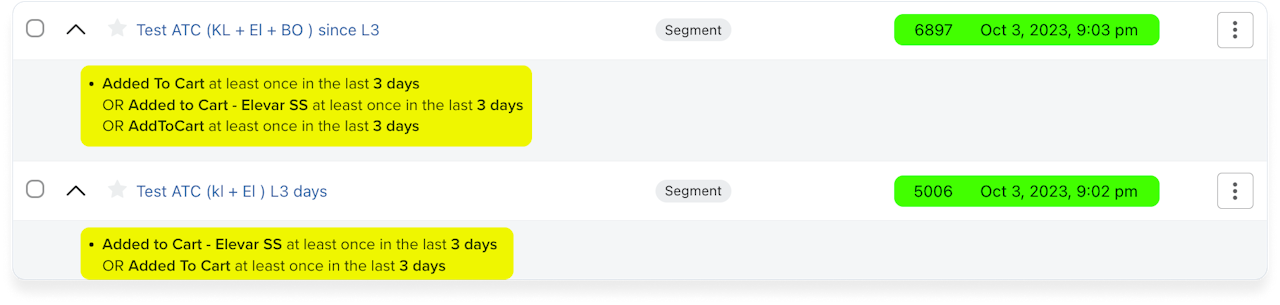
Above image is Comparing Blotout with Elevar SS plus Klaviyo events.
Segment Name: Test ATC (Klaviyo + Elevar) L3
Rule 1: Where someone has done Added to Cart at least once in last 3 days
OR
Rule 2: Where someone has done Added to Cart Elevar SS at least once in last 3 days
COMPARE TO (TEST INCREMENTAL)
Segment Name: Test ATC (Klaviyo + Elevar + Blotout) L3
Rule 1: Where someone has done Added to Cart at least once in last 3 days
OR
Rule 2: Where someone has done Added to Cart Elevar SS at least once in last 3 days
OR
Rule 3: Where someone has done AddtoCart at least once in last 3 days
Pro-tip: Just because everyone says they are server-side, does not mean managing ID assets are very well understood. The upside on mid-funnel here is the same advantage on all growth channels
Monetization
Pro-Tip: You can estimate your daily upside by purely measuring revenue per email from your existing flows
There are two key variables in building incremental flows;
Variable-1: Get your flow triggers right
Variable-2: Get your email templates right
Note: Blotout cannot help with email or SMS templates but your agency can help you. You can always reach us out on our Shared Slack
Here are the key templates for each of the flows.
Abandoned Browse Flow
Clone your existing Abandoned Browse flow
Select ViewContent as Event
Replace (Clone) -> (Blotout )
Start editing the flow
Click on Flow Trigger
Add Rule -> AND someone has done something zero times (select Viewed Product) since starting the flow
Add Rule -> AND someone has done something zero times (select Viewed Product) 1 hour before the flow triggered
Goal: Goal here is to ensure that user has not seen the Viewed Product Event
Abandoned Cart Flow
Clone your existing Abandoned Cart flow
Select AddtoCart as Event
Replace (Clone) -> (Blotout )
Start editing the flow
Click on Flow Trigger
Add Rule -> AND someone has done something zero times (select Added to Cart) since starting the flow
Add Rule -> AND someone has done something zero times (select Added to Cart) 1 hour before the flow triggered
Goal: Goal here is to ensure that user has not seen the Added to Cart Event
Abandoned Checkout Flow
Clone your existing Abandoned Cart flow
Select AddtoCart as Event
Replace (Clone) -> (Blotout )
Start editing the flow
Click on Flow Trigger
Add Rule -> AND someone has done something zero times (select Checkout Started) since starting the flow
Goal: Goal here is to ensure that user has not seen the Added to Cart Event
Great! May the force of retention be with you.
Pro-Tip: For high LTV brands where retention is high, we recommend building a Site Revisit flow as well
Last updated
Was this helpful?